Blog

  1. Recent Print Design Work

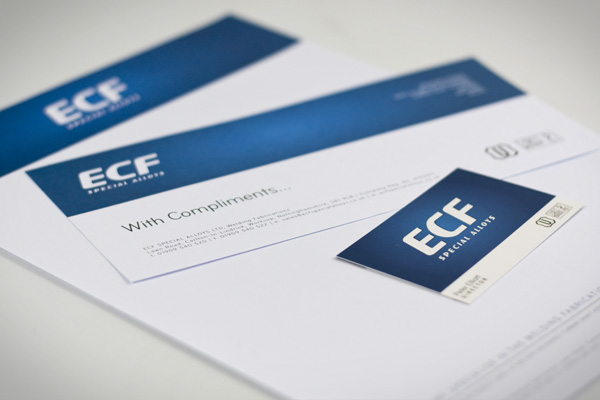
    For the last couple of months we’ve been doing quite a lot of printwork for our clients. Over the weekend we took the time to photograph some of the stationary and business cards for our new website (coming in the next few weeks), but thought that we’d share it now anyway!

    ECF Special Alloys

    ECF Letterhead, Comp Slip, Business Card

    Read more

  2. Web Design For The Browser, Not The Printer

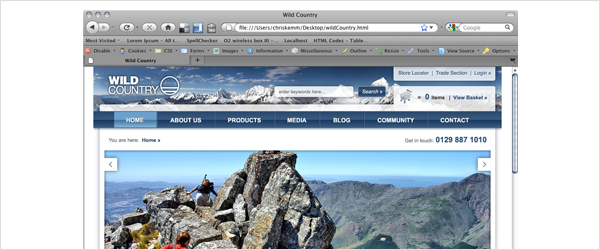
    One of my pet hates is when designers preview the websites they’re working on as an emailed .jpg, rather than as an HTML file within the browser (which usually results in it being printed by the client). A design looks completely different when it’s printed out to how it does on the screen - not only are you printing a 72dpi / RGB design, but a printer renders text and images completely differently to a monitor. A website is a piece of interactive digital artwork and so should be shown in this way, even in the first stages of it’s development. Seeing as though 1024 x 768 is still the most popular screen size, when presenting your designs you should obviously make sure they work at this resolution, but by putting your design in a HTML file you are able to present it in any number of resolutions - Go on, impress your client by going that little step further and help them see that their site will look different, but just as great, on their computer compared to your 27″ iMac! ;-)

    website-in-firefox

    Read more

  3. 4 Great New Ways To Share Your Creativity

    All creatives, be it web designers, illustrators, photographers, fashion designers, artists, and all the rest, need to be able to get the things that they create out into the big bad world, or Internet as the case may be. For some of us (namely web designers / developers) it’s a little easier than others, because it’s our job. But no matter who you are or what your profession, we could all do with a little help to make life a bit easier.

    In this post I’m going to talk about 4 of the best new and up-and-coming websites designed to help us creatives get our content out there. Some of them are so new in fact, that they are still in BETA testing, but they are definitely ones to watch out for…

    Flavors.me

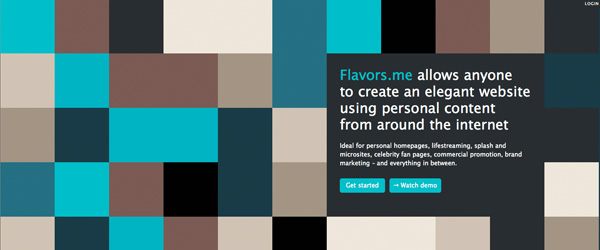
    Flavors.me

    Flavors.me has been publicly available for one or two months now, and it’s a great way to collate all (or most) of your social networking information. It’s fantastic for someone who is active all over the web, but doesn’t have, or is struggling to get a solid online portfolio together.

    Read more

  4. Convert Your Non-Purchasers To Purchasers With Great Email Marketing

    Getting your non-purchasers to buy from your email can sometimes prove to be challenging – you may have a lot less information gathered on them, you may not know who has and hasn’t purchased, or the recipients may simply not be interested in purchasing. To know is to understand, and although you may not have a magic ball to predict your non-purchasers’ behaviour, there are a few tricks to improving your non-purchaser conversion rate.

    Great Email Marketing

    First, segment your list

    Splitting up your purchasers and non-purchasers is one of the easiest list segmentations you can do. By separating your lists, you can begin to monitor how each group behaves like for like.

    Read more

  5. Designing From The Top Down - A New Way To Design For The Web

    We recently attended Speak the Web in Sheffield and Leeds and brought a lot of really useful information and ideas away with us. I attended the Leeds talk where Andy Clarke, a well respected designer, leader of web design studio Stuff and Nonsense, and CSS guru, presented a preview of his new publication “Hardboiled web design“.

    The main theme around his talk (and something that we put into practice at What!?) is top-down web design and development.

    Top Down Web Design

    Read more

  6. HTML5 for Beginners. Use it now, its easy!

    Ok, so there are a lot of articles out there on HTML5, especially since Google Wave arrived (because it’s the first major app to run on the language), but all the information that you need to know in order to start using it now is either too complicated, or spread out over various websites / articles / tutorials. Hopefully in this article we’ll be able to amalgamate and condense a lot of this information so that anyone with basic HTML knowledge can start using it.

    html5.0

    Before I start I’d just like to say a big thank you to the Speak the Web guys who put a series of talks on in the north of England over the last two weeks. The gigs each had a speaker from Opera (amongst others) who enlightened many of us to the true potential of HTML5, and why we should start using it sooner rather than later.

    Read more

  7. Styling HTML Emails with Disabled Images

    image

    The styling and formating of marketing emails is a fine art, but many people are missing a key factor with their design and build that may make or break the user’s decision to view the email in its entirety…

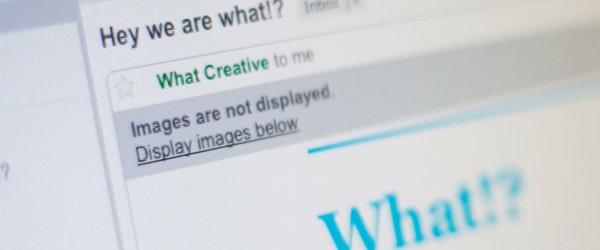
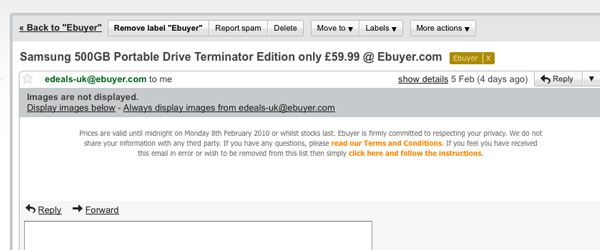
    We are all familiar with an email dropping in our inbox and appearing as blank white space:

    ebuyer

    The above image is an example of emails not being designed and built to work with images disabled. To help with explaining this process I have built a quick email to illustrate how alt tags can be styled, cells coloured, and text positioned to produce a professional looking email before any images have been downloaded. By using these techniques the user will be given an impression of the message, and an incentive to turn on images and view your email in it’s entirety.

    Read more

  8. 5 Ways to Effectively Back Up Your Files

    When 90% of your time is spent working at your computer, finding a simple, effective way of backing up all of your files is a must. Whether you are a full studio / agency, or a freelancer, your income and livelihood will most probably be dependent on you being able to access the files that you created the day, week, or month before. Now, we are all all too familiar with the nightmare of forgetting to save a file and then the software kindly crashing on us, but just imagine if your entire hard-drive failed!

    Most of you are already backing up your data in some way or another I’m sure, but here are 5 ways that you could potentially do it a little more effectively:

    External (Offline) Storage

    1. Time Machine

    Apple Time Machine

    If you own a Mac, then Time Machine is definitely one of, if not the best option out there for external storage. It works with any hard-drive so you don’t have to buy Apple’s own Time Capsule and it automatically backs up all of your data on an hourly, daily, and monthly basis.

    It is recommended that if you’re going to use Time Machine then you should buy an external drive that is twice the size of your computer’s. This is simply because of the sheer amount of data that it needs to store - just think how many files you work on / play / access in a day! I listened to this recommendation and bought a 1TB drive to back up my 500GB internal drive and it didn’t have any trouble filling up within a few months…

    The great thing about it though, besides the sexy UI, is that once the hard-drive is full, it asks if you want to start overwriting the oldest files, so effectively you never run out of room. Mine has been doing this for a while now, but I can still reach over 6 months back into old files in case I lose something!

    Read more
  9. Decode Exhibition at V.A London

    Christmas is over and its a New Year! What better way to start 2010 than an inspirational vist to ‘Decode’, the brand new exhibition at the Victoria Albert Museum.

    The exhibition is a collaboration between the V&A and onedotzero, a contemporary arts organisation operating internationally with a remit to promote innovation across all forms of moving image and interactive a. It explores digital technology though artwork and installation pieces. These are separated into three current digital design themes; Code, Interactivity, and Network.

    Code shows how computer code, whether bespoke and tailored, or hacked and shared, has become a new design tool; Interactivity presents works that respond to our physical presence; Network charts or reworks the traces we leave behind.

    We visited Decode on a trip to London and on first impressions we were very impressed. The exhibition was a little smaller than expected, however, all in all there are some excellent pieces. Physical computing is a passion of ours and last year we produced the Twitter installation ‘Status 2.0′. We left the exhibition feeling very inspired and looking forward to hopefully developing more interactive installations this year.

    Below are a selection of our favourite pieces from Decode:

    Dandelion (2009)

    Dandelion

    Interactive art installation which features a hairdryer, adaptive and meditative sound collages and a 3D rendered dandelion.

    Read more

  10. Does Your Company Need Social Media?

    There are so many articles about social media all over the newspapers at the moment: companies personally addressing customer complaints, celebrities taking over Twitter, books being published in excerpts of 140 characters…but what does social media mean for your company? And do you need it?

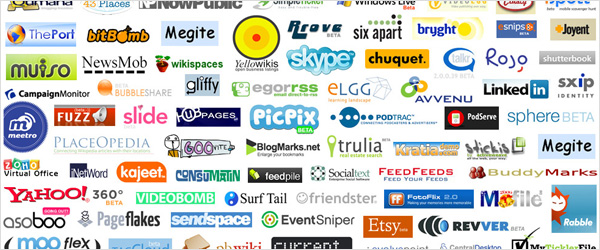
    Social Media Icons

    If you’re considering social media, you should think carefully about what you want to achieve from using it. The primary reason to use it is to engage the customer; creating two-way communication shows you care about the customer and want to listen to them. Although their feedback may not always be positive, it’s important to handle the rough with the smooth and provides a valuable lesson in PR.

    Timely and regular communication is expected in what has become an extremely fast-paced society. Ensuring you update at regular intervals means your community can begin to grow organically as more people find out about you. I’ve seen too many campaigns started without forward planning and abandoned after a couple of months. Key campaigns that are marked in the calendar should have social media planned into the list of activities surrounding them.

    So what types of social media do you need? Let’s consider three of the most popular ones: blogs, Facebook, and Twitter.

    Read more