Every year many companies, especially creative agencies have the dilemma of “what do we do for Christmas!?” We simply made some nice Christmas cards last year but this time we wanted to go one better and create something digital as well as something that’s fun, creative, and shows off our skills!
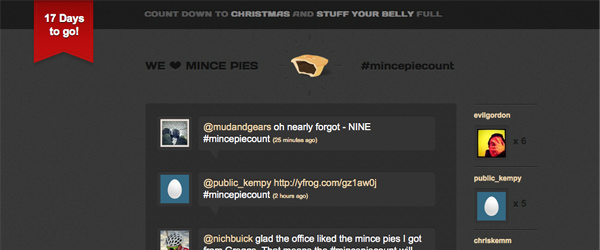
One of my past times at Christmas is eating lots of mince pies. Last year I had little competition with a few people to find out who could eat the most but we struggled to keep count. This, along with a desire to do some experimenting with new Web technologies led us to this year’s Christmas project… MincePieCount! We decided to build the website www.mincepiecount.com (check it out) that shows tweets containing the hash tag #mincepiecount. Every time you tweet with the hashtag the site records it, stores it in a database and generates a leaderboard of who’s eaten the most. So, every time I eat a mince pie and tweet the #mincepiecount tag, the site gives me +1 mince pie. Simple.
We decided to design and build the site using the ‘hottest’ code around: CSS3.
CSS3
We used a range of different CSS3 techniques on the site: animations, custom @font-face fonts, shadows, and rounded corners.
@font-face
For the titles we used the font DaysRegular. A free font available as a @font-face kit from Font Squirrel. @font-face is a great way to embed custom fonts using the following CSS:
@font-face {
        font-family: 'DaysRegular';
        src: url('../fonts/Days-webfont.eot');
        src: local('☺'), url('../fonts/Days-webfont.woff')
        format('woff'), url('../fonts/Days-webfont.ttf')
        format('truetype'), url('../fonts/Days-webfont.svg#webfontytjDQwVj')
        format('svg');
        font-weight: normal;
        font-style: normal;
}
You can read more about @font-face and embedding fonts in this post:
http://www.whatcreative.co.uk/blog/tips/font-embedding-the-law/
Rounded Corners
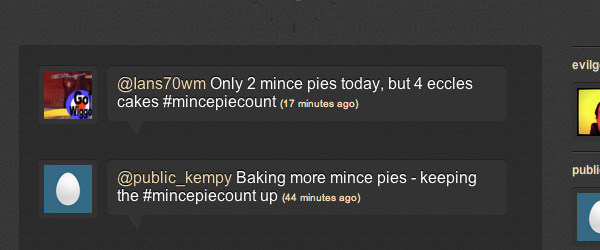
To add the rounded corners and shadows to the Twitter icons I added borders with rounded corners to the image:
.tweets-img img {
	border:5px solid #343434;
	-moz-border-radius: 3px;
	-webkit-border-radius: 3px;
        -border-radius: 3px;
}
I then added the following CSS to the surrounding div to achieve the inner shadow / glow and rounded corners:
.tweets-img {
       float:left;
       overflow:hidden;
       padding-top:1px;
       -moz-box-shadow:inset 0 1px 1px #222222;
       -webkit-box-shadow: inset 0 1px 1px #222222;
       box-shadow: inset 0 1px 1px #222222;
       -moz-border-radius: 3px;
       -webkit-border-radius: 3px;
       border-radius: 3px;
}
The inner shadow and rounded corners for the tweets were achieved using the same technique:
.tweet-text {
	float:left;
	margin:0 0 0 10px;
	width:380px;
	background:#343434;
	padding:10px;
	-moz-border-radius: 5px;
	-webkit-border-radius: 5px;
        border-radius: 5px;
	-moz-box-shadow:inset 0 1px 1px #222222;
	-webkit-box-shadow: inset 0 1px 1px #222222;
        box-shadow: inset 0 1px 1px #222222;
	position:relative;
}
Animations
CSS3 animation is something that is rapidly growing in popularity. Top designers are beginning to use it to add those little touches to websites that transform the design from being good, to being great. Even though they only work in Webkit browsers (Safari & Chrome) there’s still no reason why you shouldn’t use them now. What is the point in depriving the users of the most advanced browsers from an enhanced user experience?!
I decided that I wanted to make as much of the Christmas tree at the bottom of the page as possible using CSS3. I created the lights from divs with background colours, rounded corners to make a circle, and a shadow / glow. I then animated different sets with CSS3, making them fade in and out like twinkling lights.
I created a DIV for each light and then applied the following CSS class:
.light{
	position:absolute;
	width:6px;
	height:6px;
	-moz-border-radius: 6px;
	-webkit-border-radius: 6px;
	border-radius: 6px;
	-webkit-animation-name: FadeInOut;
	-webkit-animation-timing-function: ease-in-out;
	-webkit-animation-iteration-count: infinite;
	-webkit-animation-duration: 2s;
	-webkit-animation-direction: alternate;
}
This set all the lights to be absolutely positioned and set their corners rounded so they appear as a circle. The animation was then defined: the function, iteration, duration and the direction of the animation.
Once the styling of the animation had been set, I then needed to create the actual FadeInOut keyframes with the following CSS:
@-webkit-keyframes FadeInOut {
	0% {
		opacity:1;
	}
	20% {
		opacity:1;
	}
	55% {
		opacity:0;
	}
	100% {
		opacity:0;
	}
}
Next I set the colour of the lights, applied a shadow that gives the impression of a glow, and set their position on the tree:
#light-01 {
	background:#ff9227;
	-webkit-box-shadow: 0px 0px 5px #ff9227;
	-moz-box-shadow: 0px 0px 5px #ff9227;
        box-shadow: 0px 0px 5px #ff9227;
	top:35px;
	left:150px;
}
Finally I created a number of different classes containing various delays, which I randomly applied to the lights so they faded in and out at different times:
.delay-0 {
	-webkit-animation-delay: 0s;
}
Done!
CSS3 is a great way to add extra touches to your websites, but why not just use Flash? Well, it speeds up your builds and loading times, it doesn’t require any plugins, and of course works on my iPad!
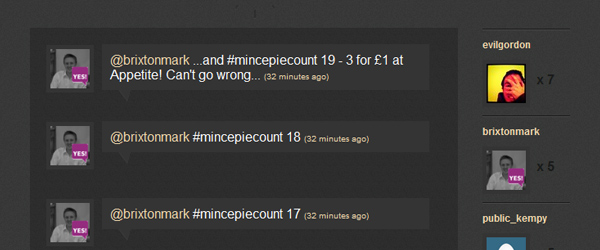
If the browser doesn’t support CSS3 it just falls back to standard CSS2. For example in IE8 and below the website elements just don’t have the extra design touches, but everything still works. Great news is that IE9 supports a lot of the CSS3 styles so more and more people will be able to enjoy the Web in these new and exciting ways.
Please check out the site www.mincepiecount.com and don’t forget everytime you eat a mince pie tweet with the hashtag #mincepiecount.
Have you been experimenting with CSS3? If so we’d love to see what you’ve been doing!
By Chris Kemm