Shortly after we finished writing our recent post on the top 10 WordPress Plugins 2011, we came across this little plugin whilst working on a WordPress CMS project. It’s developed by a guy called Elliot Condon, and we found it to be so good that we had to dedicate an entire post to it.
The Advanced Custom Fields plugin is, in one word, brilliant. For anyone looking to extend the functionality flexibility of WordPress as a CMS, without using something as complicated as Pods CMS Framework, it’s perfect.
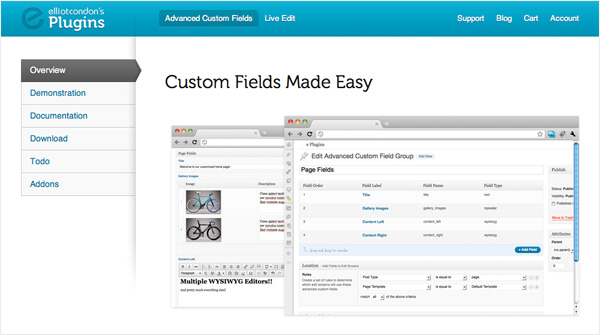
You can use it to pretty much replace the standard WP ‘Edit’ screen with whatever fields you want. It’s really simple to use, too. Once you’ve created your list of custom fields you then assign that ‘set’ to any number of templates, stick a few bits of code in your HTML, and you’re away!
Getting Started
Once you’ve got it installed you’ll get an ‘Adv Custom Fields’ link under your ‘Settings’ tab, which is where you control the majority of the plugin from. Click this, then ‘Add New’ at the top, and you’re presented with this screen:
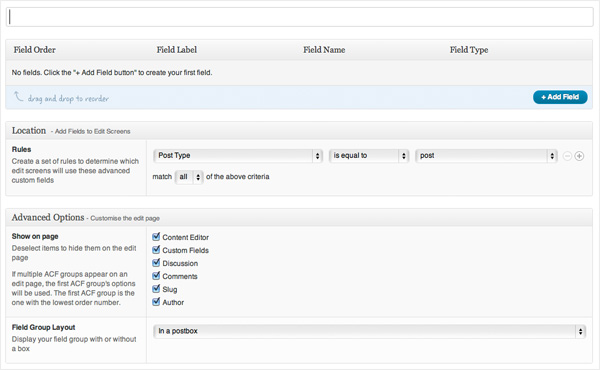
From here you can give your field set a name and add all your fields, which include a Field Label, Field Name, Field Type, and Field Instructions (this last one is a great little touch for guiding your clients, or anyone that may be using the CMS in the right direction - be warned though, don’t put anything in there that looks like HTML or you’ll break it!).
The next step is to tell it which template(s) to apply the field set to, and then finally you can choose to turn off any or all of the standard ‘Edit boxes’ on that Template Page. (To be honest I’ve found myself turning the majority, if not all of these off and completely rebuilding the pages with custom fields - it just gives you so much flexibility).
Finally, to add the field content to your template page, it’s as simple as adding the following:
<?php the_field($field_name); ?>
…obviously replacing ‘field_name’ with the name you assigned to that field you want to display.
I won’t go into too much detail because there’s enough information on the plugin website, including some tutorial videos to help get you going.
Oh, and one final thing - this plugin is free. Double bonus!
Addons / Extensions
At the time of writing there are currently two addons available for the small fee of $25 AUD each. This fee grants you use of the addons on unlimited websites, so it’s well worth it, especially considering how useful they are.
The first is the Options Page addon. When enabled this adds a tab, believe it or not, called ‘Options’ to your WP admin, which allows you to create a bunch of ‘site-wide’ fields. This is really useful for things like contact info, which might appear on a number of pages throughout your site.
The second is the Repeater Field addon. This does exactly what it says on the tin and is really useful for creating image galleries and lists of data. It also allows you to limit the number of repeating fields available to your users, but is flexible up to this limit. For example, if you have a limit of 5 then your users can add any number of fields between 1 and 5 depending on how many images / bullet points they want in their list.
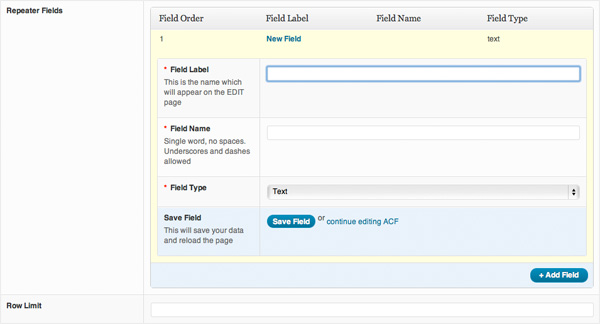
The code is very slightly more complicated for this field, but hardly:
<?php if(get_field('gallery_images')): ?>
<?php while(the_repeater_field('gallery_images')): ?>
<img src="<?php the_sub_field('image'); ?>" alt="<?php the_sub_field('alt'); ?>" />
<?php endwhile; ?>
<?php endif; ?>
Conclusion
So far I’ve found absolutely nothing wrong with this great little plugin. It makes a developer’s life very easy and allows you to create very user friendly WordPress content management systems for your clients. In fact I think that’s the main reason I like it so much. It’s user friendly. And for non-tech-savvy clients trying to use WordPress, that’s very important.
Nice one Elliot.
Shortlink:
By Chris Skelton