I was given the task of building a MailChimp template the other week. It’s been a while since I’ve done one but I knew the basics of it all. Since I last worked on template building, MailChimp has made some pretty good progress… We can now have hideable areas and the interface that you use for building newsletters seems to be a lot less buggy.
What I’m going to teach you today is how to build repeating content areas, which look different, but use the same piece of code. You can then hide certain parts of the code to alter the layout. You may think this sounds pretty simple but there are a few things to take into account; namely who will be using your template, what skill level they have, and how compatible you want to make the template with email clients such as the dreaded Lotus Notes.
As this article is specifically aimed at MailChimp and their templates, I’m going to assume that you know what MailChimp template tags to use for hideable and repeatable content sections. If you don’t, you can find the template tag guide here.
The Task
Build a content section that may or may not have an image in it. If it does have an image, the image will be on the right, with text to the left and text underneath. The image has a border of 1px with padding between the border and the image of 3px. Here’s an example of the two content section options we’ll be able to achieve:
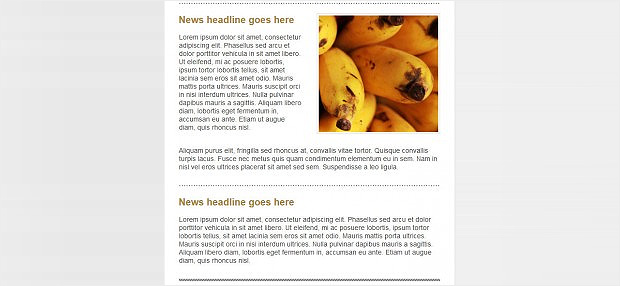
What we need to make
- A text content cell
- A spacer column
- An image cell
- A cell spanning all three of these columns with text which “wraps” underneath the image.
Part 1 – Build the image section
We could do this simply by adding the 1px border and the padding to the image itself, but that would be a bit annoying, especially when the client doesn’t know how to use Photoshop.
Another option would be to put a 1px border on using CSS but some Lotus Note clients don’t support borders (and hey, we’re trying to make this as compatible as possible…) so we have to make a <table> with the image in the centre cell, surrounded by 1px high borders for the top and bottom and 1px wide borders for the sides, filled with transparent gifs and background colours. We also set the cells’ widths and heights as a fallback in case images are disabled. That gives us a 3 x 3 cell table.
But that’s not all…we also need to give our image 3px padding. Once again, css support for padding is patchy so we need to fake it using table cells with transparent gifs in. We also set the cells’ widths and heights as a fallback in case images are disabled. This will increase our table to 5 x 5 cells.
The Code
<table width="255" border="0" cellpadding="0" cellspacing="0">
        <!--border top row -->
        <tr>
            <td height="1" width="1" bgcolor="#DADADA"><img src="spacer.gif" height="1" width="1" border="0" style="display:block;visibility:hidden" alt=""></td>
            <td height="1" bgcolor="#DADADA"><img src="spacer.gif" height="1" width="1" border="0" style="display:block;visibility:hidden" alt=""></td>
            <td height="1" bgcolor="#DADADA"><img src="spacer.gif" height="1" width="1" border="0" style="display:block;visibility:hidden" alt=""></td>
            <td height="1" bgcolor="#DADADA"><img src="spacer.gif" height="1" width="1" border="0" style="display:block;visibility:hidden" alt=""></td>
            <td height="1" width="1" bgcolor="#DADADA"><img src="spacer.gif" height="1" width="1" border="0" style="display:block;visibility:hidden" alt=""></td>
        </tr><!-- padding top row-->
        <tr>
            <td height="3" bgcolor="#DADADA"><img src="spacer.gif" height="3" width="1" border="0" style="display:block;visibility:hidden" alt=""></td>
            <td height="3" bgcolor="#FFFFFF"><img src="spacer.gif" height="3" width="1" border="0" style="display:block;visibility:hidden" alt=""></td>
            <td height="3" bgcolor="#FFFFFF"><img src="spacer.gif" height="3" width="1" border="0" style="display:block;visibility:hidden" alt=""></td>
            <td height="3" bgcolor="#FFFFFF"><img src="spacer.gif" height="3" width="1" border="0" style="display:block;visibility:hidden" alt=""></td>
            <td height="3" bgcolor="#DADADA"><img src="spacer.gif" height="3" width="1" border="0" style="display:block;visibility:hidden" alt=""></td>
        </tr><!-- image row-->
        <tr>
            <td height="1" width="1" bgcolor="#DADADA"><img src="spacer.gif" height="1" width="1" border="0" style="display:block;visibility:hidden" alt=""></td>
            <td width="3" bgcolor="#FFFFFF"><img src="spacer.gif" height="1" width="3" border="0" style="display:block;visibility:hidden" alt=""></td>
            <td><img mc:edit="section-two-image" src="bananas.jpg" alt="" class="border-image" style="display:block;max-width:247px;" border="0"></td>
            <td width="3" bgcolor="#FFFFFF"><img src="spacer.gif" height="1" width="3" border="0" style="display:block;visibility:hidden" alt=""></td>
            <td height="1" width="1" bgcolor="#DADADA"><img src="spacer.gif" height="1" width="1" border="0" style="display:block;visibility:hidden" alt=""></td>
        </tr><!--padding bottom row-->
        <tr>
            <td height="3" bgcolor="#DADADA"><img src="spacer.gif" height="3" width="1" border="0" style="display:block;visibility:hidden" alt=""></td>
            <td height="3" bgcolor="#FFFFFF"><img src="spacer.gif" height="3" width="1" border="0" style="display:block;visibility:hidden" alt=""></td>
            <td height="3" bgcolor="#FFFFFF"><img src="spacer.gif" height="3" width="1" border="0" style="display:block;visibility:hidden" alt=""></td>
            <td height="3" bgcolor="#FFFFFF"><img src="spacer.gif" height="3" width="1" border="0" style="display:block;visibility:hidden" alt=""></td>
            <td height="3" bgcolor="#DADADA"><img src="spacer.gif" height="3" width="1" border="0" style="display:block;visibility:hidden" alt=""></td>
        </tr><!-- border bottom row-->
        <tr>
            <td height="1" width="1" bgcolor="#DADADA"><img src="spacer.gif" height="1" width="1" border="0" style="display:block;visibility:hidden" alt=""></td>
            <td height="1" bgcolor="#DADADA"><img src="spacer.gif" height="1" width="1" border="0" style="display:block;visibility:hidden" alt=""></td>
            <td height="1" bgcolor="#DADADA"><img src="spacer.gif" height="1" width="1" border="0" style="display:block;visibility:hidden" alt=""></td>
            <td height="1" bgcolor="#DADADA"><img src="spacer.gif" height="1" width="1" border="0" style="display:block;visibility:hidden" alt=""></td>
            <td height="1" width="1" bgcolor="#DADADA"><img src="spacer.gif" height="1" width="1" border="0" style="display:block;visibility:hidden" alt=""></td>
        </tr>
    </table>
Part 2 - Making parts hideable
So now we’ve got our image part built, it’s time to slot the text content and the image table into two columns. But actually, we need to separate them with a divider column to give our image some breathing space. To be super clever, we don’t want to have to make both the column cell and the image cell hideable separately (the column will likely be forgotten). We could add the column as part of our image table, but either we’d have to use a rowspan (which causes compatibility issues with some older versions of Lotus Notes), add an extra cell to every row in the image table, or we could make a new nested table with the column in one cell and the image table in the other cell. I chose the latter, because it adds less code and image bulk than adding 5 extra cells.
Part 3 - Wrapping text underneath the image
We’ve got an image and a column which we can hide together, but now we need to add a hideable text cell underneath. The problem is that in the current situation, we have two cells across, which would mean our wrapping text would need a colspan. How can we solve this? Well we need to return to our two cells above and nest them in another table. That way we can make a table row underneath which is only on cell across.
<td width="285" mc:hideable>
                <table width="285" border="0" cellpadding="0" cellspacing="0">
                    <tr>
                        <td width="30"><img src="spacer.gif" width="30" height="1" style="display:block;visibility:hidden" alt=""></td>
                        <td width="255" align="right">
                            <table width="255" border="0" cellpadding="0" cellspacing="0">
                                <!--border top row -->
                                <tr>
                                    <td height="1" width="1" bgcolor="#DADADA"><img src="spacer.gif" height="1" width="1" border="0" style="display:block;visibility:hidden" alt=""></td>
                                    <td height="1" bgcolor="#DADADA"><img src="spacer.gif" height="1" width="1" border="0" style="display:block;visibility:hidden" alt=""></td>
                                    <td height="1" bgcolor="#DADADA"><img src="spacer.gif" height="1" width="1" border="0" style="display:block;visibility:hidden" alt=""></td>
                                    <td height="1" bgcolor="#DADADA"><img src="spacer.gif" height="1" width="1" border="0" style="display:block;visibility:hidden" alt=""></td>
                                    <td height="1" width="1" bgcolor="#DADADA"><img src="spacer.gif" height="1" width="1" border="0" style="display:block;visibility:hidden" alt=""></td>
                                </tr><!-- padding top row-->
                                <tr>
                                    <td height="3" bgcolor="#DADADA"><img src="spacer.gif" height="3" width="1" border="0" style="display:block;visibility:hidden" alt=""></td>
                                    <td height="3" bgcolor="#FFFFFF"><img src="spacer.gif" height="3" width="1" border="0" style="display:block;visibility:hidden" alt=""></td>
                                    <td height="3" bgcolor="#FFFFFF"><img src="spacer.gif" height="3" width="1" border="0" style="display:block;visibility:hidden" alt=""></td>
                                    <td height="3" bgcolor="#FFFFFF"><img src="spacer.gif" height="3" width="1" border="0" style="display:block;visibility:hidden" alt=""></td>
                                    <td height="3" bgcolor="#DADADA"><img src="spacer.gif" height="3" width="1" border="0" style="display:block;visibility:hidden" alt=""></td>
                                </tr><!-- image row-->
                                <tr>
                                    <td height="1" width="1" bgcolor="#DADADA"><img src="spacer.gif" height="1" width="1" border="0" style="display:block;visibility:hidden" alt=""></td>
                                    <td width="3" bgcolor="#FFFFFF"><img src="spacer.gif" height="1" width="3" border="0" style="display:block;visibility:hidden" alt=""></td>
                                    <td><img mc:edit="section-two-image" src="bananas.jpg" alt="" class="border-image" style="display:block;max-width:247px;" border="0"></td>
                                    <td width="3" bgcolor="#FFFFFF"><img src="spacer.gif" height="1" width="3" border="0" style="display:block;visibility:hidden" alt=""></td>
                                    <td height="1" width="1" bgcolor="#DADADA"><img src="spacer.gif" height="1" width="1" border="0" style="display:block;visibility:hidden" alt=""></td>
                                </tr><!--padding bottom row-->
                                <tr>
                                    <td height="3" bgcolor="#DADADA"><img src="spacer.gif" height="3" width="1" border="0" style="display:block;visibility:hidden" alt=""></td>
                                    <td height="3" bgcolor="#FFFFFF"><img src="spacer.gif" height="3" width="1" border="0" style="display:block;visibility:hidden" alt=""></td>
                                    <td height="3" bgcolor="#FFFFFF"><img src="spacer.gif" height="3" width="1" border="0" style="display:block;visibility:hidden" alt=""></td>
                                    <td height="3" bgcolor="#FFFFFF"><img src="spacer.gif" height="3" width="1" border="0" style="display:block;visibility:hidden" alt=""></td>
                                    <td height="3" bgcolor="#DADADA"><img src="spacer.gif" height="3" width="1" border="0" style="display:block;visibility:hidden" alt=""></td>
                                </tr><!-- border bottom row-->
                                <tr>
                                    <td height="1" width="1" bgcolor="#DADADA"><img src="spacer.gif" height="1" width="1" border="0" style="display:block;visibility:hidden" alt=""></td>
                                    <td height="1" bgcolor="#DADADA"><img src="spacer.gif" height="1" width="1" border="0" style="display:block;visibility:hidden" alt=""></td>
                                    <td height="1" bgcolor="#DADADA"><img src="spacer.gif" height="1" width="1" border="0" style="display:block;visibility:hidden" alt=""></td>
                                    <td height="1" bgcolor="#DADADA"><img src="spacer.gif" height="1" width="1" border="0" style="display:block;visibility:hidden" alt=""></td>
                                    <td height="1" width="1" bgcolor="#DADADA"><img src="spacer.gif" height="1" width="1" border="0" style="display:block;visibility:hidden" alt=""></td>
                                </tr>
                            </table>
                        </td>
                    </tr>
                    <tr>
                        <td></td>
                        <td height="25"><img src="spacer.gif" height="25" width="1" border="0" style="display:block;visibility:hidden" alt=""></td>
                    </tr>
                </table>
            </td>
Why can’t I just put the wrapping text cell in a new table underneath? Because we need to make the whole section repeatable, so it’s got to be in one single section.
Part 4 – Put it all together
We’re going to spruce up the text section by slotting another table into the text cell, which will enable us to have heading styles which are different to the content styles. We also need to make sure there’s a spacer above the header so if we repeat the section there’ll be space between them.
Here’s the final code:
<table width="540" align="center" cellpadding="0" cellspacing="0" border="0" mc:repeatable>
        <tr>
            <td height="2" align="center"><img src="hr.gif" alt="" width="537" height="2" style="display:block;"></td>
        </tr>
        <tr>
            <td height="20"><img src="spacer.gif" height="20" alt="" style="display:block;visibility:hidden;"></td>
        </tr>
        <tr>
            <td valign="top">
                <table width="100%" cellpadding="0" cellspacing="0" border="0">
                    <tr>
                        <td valign="top">
                            <table width="100%" cellpadding="0" cellspacing="0" border="0">
                                <tr>
                                    <td mc:edit="section-two-heading" class="market-update-heading" align="left">News headline goes here</td>
                                </tr>
                                <tr>
                                    <td height="15"><img src="spacer.gif" height="15" alt="" style="display:block;visibility:hidden;"></td>
                                </tr>
                                <tr>
                                    <td mc:edit="section-two-content" class="market-update-contentsection" align="left" valign="top">Writing here</td>
                                </tr>
                            </table>
                        </td>
                        <td width="285" mc:hideable>
                            <table width="285" border="0" cellpadding="0" cellspacing="0">
                                <tr>
                                    <td width="30"><img src="spacer.gif" width="30" height="1" style="display:block;visibility:hidden" alt=""></td>
                                    <td width="255" align="right">
                                        <table width="255" border="0" cellpadding="0" cellspacing="0">
                                            <!--border top row -->
                                            <tr>
                                                <td height="1" width="1" bgcolor="#DADADA"><img src="spacer.gif" height="1" width="1" border="0" style="display:block;visibility:hidden" alt=""></td>
                                                <td height="1" bgcolor="#DADADA"><img src="spacer.gif" height="1" width="1" border="0" style="display:block;visibility:hidden" alt=""></td>
                                                <td height="1" bgcolor="#DADADA"><img src="spacer.gif" height="1" width="1" border="0" style="display:block;visibility:hidden" alt=""></td>
                                                <td height="1" bgcolor="#DADADA"><img src="spacer.gif" height="1" width="1" border="0" style="display:block;visibility:hidden" alt=""></td>
                                                <td height="1" width="1" bgcolor="#DADADA"><img src="spacer.gif" height="1" width="1" border="0" style="display:block;visibility:hidden" alt=""></td>
                                            </tr><!-- padding top row-->
                                            <tr>
                                                <td height="3" bgcolor="#DADADA"><img src="spacer.gif" height="3" width="1" border="0" style="display:block;visibility:hidden" alt=""></td>
                                                <td height="3" bgcolor="#FFFFFF"><img src="spacer.gif" height="3" width="1" border="0" style="display:block;visibility:hidden" alt=""></td>
                                                <td height="3" bgcolor="#FFFFFF"><img src="spacer.gif" height="3" width="1" border="0" style="display:block;visibility:hidden" alt=""></td>
                                                <td height="3" bgcolor="#FFFFFF"><img src="spacer.gif" height="3" width="1" border="0" style="display:block;visibility:hidden" alt=""></td>
                                                <td height="3" bgcolor="#DADADA"><img src="spacer.gif" height="3" width="1" border="0" style="display:block;visibility:hidden" alt=""></td>
                                            </tr><!-- image row-->
                                            <tr>
                                                <td height="1" width="1" bgcolor="#DADADA"><img src="spacer.gif" height="1" width="1" border="0" style="display:block;visibility:hidden" alt=""></td>
                                                <td width="3" bgcolor="#FFFFFF"><img src="spacer.gif" height="1" width="3" border="0" style="display:block;visibility:hidden" alt=""></td>
                                                <td><img mc:edit="section-two-image" src="bananas.jpg" alt="" class="border-image" style="display:block;max-width:247px;" border="0"></td>
                                                <td width="3" bgcolor="#FFFFFF"><img src="spacer.gif" height="1" width="3" border="0" style="display:block;visibility:hidden" alt=""></td>
                                                <td height="1" width="1" bgcolor="#DADADA"><img src="spacer.gif" height="1" width="1" border="0" style="display:block;visibility:hidden" alt=""></td>
                                            </tr><!--padding bottom row-->
                                            <tr>
                                                <td height="3" bgcolor="#DADADA"><img src="spacer.gif" height="3" width="1" border="0" style="display:block;visibility:hidden" alt=""></td>
                                                <td height="3" bgcolor="#FFFFFF"><img src="spacer.gif" height="3" width="1" border="0" style="display:block;visibility:hidden" alt=""></td>
                                                <td height="3" bgcolor="#FFFFFF"><img src="spacer.gif" height="3" width="1" border="0" style="display:block;visibility:hidden" alt=""></td>
                                                <td height="3" bgcolor="#FFFFFF"><img src="spacer.gif" height="3" width="1" border="0" style="display:block;visibility:hidden" alt=""></td>
                                                <td height="3" bgcolor="#DADADA"><img src="spacer.gif" height="3" width="1" border="0" style="display:block;visibility:hidden" alt=""></td>
                                            </tr><!-- border bottom row-->
                                            <tr>
                                                <td height="1" width="1" bgcolor="#DADADA"><img src="spacer.gif" height="1" width="1" border="0" style="display:block;visibility:hidden" alt=""></td>
                                                <td height="1" bgcolor="#DADADA"><img src="spacer.gif" height="1" width="1" border="0" style="display:block;visibility:hidden" alt=""></td>
                                                <td height="1" bgcolor="#DADADA"><img src="spacer.gif" height="1" width="1" border="0" style="display:block;visibility:hidden" alt=""></td>
                                                <td height="1" bgcolor="#DADADA"><img src="spacer.gif" height="1" width="1" border="0" style="display:block;visibility:hidden" alt=""></td>
                                                <td height="1" width="1" bgcolor="#DADADA"><img src="spacer.gif" height="1" width="1" border="0" style="display:block;visibility:hidden" alt=""></td>
                                            </tr>
                                        </table>
                                    </td>
                                </tr>
                                <tr>
                                    <td></td>
                                    <td height="25"><img src="spacer.gif" height="25" width="1" border="0" style="display:block;visibility:hidden" alt=""></td>
                                </tr>
                            </table>
                        </td>
                    </tr>
                </table>
            </td>
        </tr>
        <tr>
            <td valign="top" align="left" class="market-update-contentsection" mc:hideable mc:edit="section-two-content-secondary">Secondary optional text section</td>
        </tr>
        <tr>
            <td height="30"><img src="spacer.gif" height="30" alt="" style="display:block;visibility:hidden;"></td>
        </tr>
    </table>
The Template
Here’s what the template will look like without content:

Want all the files? Download the zip file here.
View a live demo here.
By Becs Rivett